Oracle database upgrade 12c to 19c with Standby on ODA
 André Luiz Dutra Ontalba
publicado
leitura 3 min
cost 523 palavras
André Luiz Dutra Ontalba
publicado
leitura 3 min
cost 523 palavras

This is the system:
- 2 Oracle Database Appliances
- Databases running as a single instance
- DataGuard between ODA-1 and ODA-2 for mission-critical databases
- Databases, 12.2 and 19.8
- Currently running ODA 19.8.0.0
The mission is to upgrade one of these 12.2 databases to 19.8. So the basic steps are as follows:
- Validate Oracle Home for version 19.8
- Disable DataGuard configuration
- Stop DataGuard Broker processes
- Stop Standby database
- Upgrade Primary database
- Start Standby database from new home
On an ODA this is quite simple to do. First list Oracle Home an both ODAs:
root@oda-duts-01 ~ # odacli list-dbhomes

ID                                       Name                 DB Version                               Home Location                                 Status

---------------------------------------- -------------------- ---------------------------------------- --------------------------------------------- ----------

7c724f57-a495-4db9-a88a-48323f3632c6     OraDB12201_home1     11.2.0.4.200414                          /u01/app/oracle/product/12.2.0.1/dbhome_1     CONFIGURED

7c525f55-a494-4db7-a70a-45356f3562c6     OraDB1908_home1     11.2.0.4.200414                          /u01/app/oracle/product/19.8.0.0/dbhome_1     CONFIGURED
Next step is disabling the DataGuard configuration:
oracle@oda-duts-02~#  dgmgrl
DGMGRL> connect sys/****@primary

Connected.

DGMGRL> disable configuration

Disabled.
Now stop the DataGuard Broker processes on both, primary and standby:
oracle@oda-duts-02 ~ # sqlplus / as sysdba

SQL> alter system set dg_broker_start=false scope=both;

System altered.
Stop the Standby database:
root@oda-duts-02# srvctl stop database -d DUTSDB
Now do the upgrade of the Primary to the Oracle Home 19c.
root@oda-duts-01# odacli upgrade-database -i d1c80b77-1e74-4643-8b3b-3cac65041340 -to 7c525f55-a494-4db7-a70a-45356f3562c6
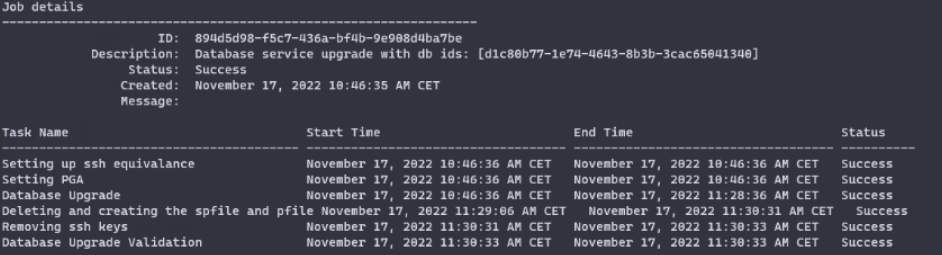
That’s it for the Primary. Now modify the Standby to use the new 19c Database Home. Copy the password file to the new Oracle Home, and, if it is not in a shared location, the SPfile too.
root@oda-duts-02# cp /u01/app/oracle/product/12.2.0.0/dbhome_1/dbs/orapwDUTSDB /u01/app/oracle/product/19.8.0.0/dbhome_1/dbs/

root@oda-duts-02# cp /u01/app/oracle/product/12.2.0.0/dbhome_1/dbs/orapwDUTSDB /dbs/spfileDUTSDB.ora /u01/app/oracle/product/19.8.0.0/dbhome_1/dbs/
The database resource needs to be modified in order to use the new Oracle Home. That is the last time that “srvctl” is run from the old Oracle Home:
root@oda-duts-02# srvctl config database -d DUTSDB

root@oda-duts-02# srvctl modify database -d DUTSDB -o /u01/app/oracle/product/19.8.0.0/dbhome_1
If required, change the SPfile location too:
root@oda-duts-02# srvctl modify database -d DUTSDB -p /u01/app/oracle/product/19.8.0.0/dbhome_1/dbs/spfileDUTSDB.ora
Now the Standby can be started again:
root@oda-duts-02# srvctl start database -d DUTSDB
Last step is to start the DataGuard Broker processes and re-enable the configuration.
oracle@oda-duts-02 ~ # sqlplus / as sysdba

SQL> alter system set dg_broker_start=true scope=both;

System altered.

oracle@oda-duts-02~#  dgmgrl

DGMGRL> connect sys/****@primary

Connected.

DGMGRL> enable configuration

Enabled.
After a few minutes show the configuration of Data Guard.
DGMGRL> show configuration

Configuration - DUTSDG

  Protection Mode: MaxPerformance

  Members:

  DUTSDB   - Primary database

    DUTSDB_DG - Physical standby database

Fast-Start Failover: DISABLED

Configuration Status:

SUCCESS
Hope this helps you!!!
Disclaimer: “The postings on this site are my own and don’t necessarily represent may actual employer positions, strategies or opinions. The information here was edited to be useful for general purpose, specific data and identifications was removed to allow reach generic audience and to be useful
André Luiz Dutra Ontalba
DBA ATG Oracle há 27 anos, especialista em Banco de Dados Oracle e SQL SERVER, MySQL, Azure, AWS, Oracle Cloud. Bacharel em Ciências da Computação Pós Graduado pela FIAP em Administração de Banco de dados, MBA em Administração de TI pela FGV a MBA em Master Information Technology pela FIAP e BABSON e Mestrado em Gestão Estratégica em Tecnologias de Informação pela UNIATLANTICO e UNIB . Com sólidos conhecimentos em Banco de Dados e Sistemas operacionais, possui certificações Oracle OCP 10g/11/12g/2019 Oracle Cloud Professional, AWS Professional, Azure Expert e mais 85 outra certificações. Strategic Customer Service Manager at Oracle / Oracle ACE Alumni Member