OSWatcher como instalar e usar
 André Luiz Dutra Ontalba
publicado
leitura 10 min
cost 2,256 palavras
André Luiz Dutra Ontalba
publicado
leitura 10 min
cost 2,256 palavras

Estou com um problem em um compute instance no OCI, e o support me solicitou um OSWatcher para analisar o ambiente.
Diante disso como eu não tinha nenhum documento facilitando uma busca rápida, resolvi escrever este post para pode ajudar outras pessoas que no momento de necessitarem de uma consulta rápida não precisem ficar se matando para achar as informações.
Vamos lá para nossa instalação.
Relatórios de desempenho do Oracle OSWatcher
A ferramenta OSWatcher é uma ferramenta muito interessante que coleta e mantém dados estatísticos dos recursos do sistema operacional periodicamente e nos reporta. Você pode baixar e usar o software OSWatcher do suporte Oracle.
OSWatcher (Doc ID 301137.1)
OS Watcher User’s Guide (Doc ID 1531223.1)
A ferramenta OSWatcher executa alguns comandos como TOP, iostat, vmstat, netstat em determinados intervalos e mantém esses dados no servidor.
Instalação do OSWatcher
Passo 1: Baixe o OSWatcher e extraia-o conforme a seguir.
[opc@vm-blog oswbb]$ ll
total 5132
-rw-rw-r-- 1 opc opc 5253120 Dec 12 20:49 oswbb840.tar
[opc@vm-blog oswbb]$
[opc@vm-blog oswbb]$ tar -xvf oswbb840.tar
oswbb/
oswbb/uncpr.bat
oswbb/sarsub.sh
oswbb/psmemsub.sh
oswbb/stopOSWbb.sh
oswbb/analysis/
oswbb/piddsub.sh
oswbb/arpsub.sh
oswbb/docs/
oswbb/docs/OSWatcher/
oswbb/docs/OSWatcher/oswbb_README.txt
oswbb/docs/OSWatcher/RAC_Traceroute_Automation_Readme.txt
oswbb/docs/OSWatcher/OSWatcherUserGuide.html
oswbb/docs/The_Analyzer/
oswbb/docs/The_Analyzer/AnalyzerUserGuide.html
oswbb/docs/The_Analyzer/oswbba_README.txt
oswbb/docs/OSWatcherOverview_840.pdf
oswbb/Exampleprivate.net
oswbb/tmp/
oswbb/oswbba.jar
oswbb/oswib.sh
oswbb/ltop.sh
oswbb/archive/
oswbb/oswnet.sh
oswbb/call_uptime.sh
oswbb/OSWatcher.sh
oswbb/vmsub.sh
oswbb/pidsub.sh
oswbb/src/
oswbb/src/js/
oswbb/src/js/bootstrap.js
oswbb/src/js/modernizr.js
oswbb/src/js/jquery-2.1.4.min.js
oswbb/src/js/THIRDPARTYLICENSE.txt
oswbb/src/js/jquery.lightbox.js
oswbb/src/js/tabs.js
oswbb/src/js/scripts.js
oswbb/src/js/templatemo_custom.js
oswbb/src/Thumbs.db
oswbb/src/fonts/
oswbb/src/fonts/FontAwesome.otf
oswbb/src/fonts/fontawesome-webfont.woff
oswbb/src/fonts/fontawesome-webfont.woff2
oswbb/src/fonts/fontawesome-webfont.eot
oswbb/src/fonts/fontawesome-webfont.ttf
oswbb/src/fonts/fontawesome-webfont.svg
oswbb/src/META-INF/
oswbb/src/META-INF/application-client.xml
oswbb/src/images/
oswbb/src/images/Thumbnail_Placeholder.png
oswbb/src/images/next.png
oswbb/src/images/bx_loader.gif
oswbb/src/images/close.png
oswbb/src/images/loading.gif
oswbb/src/images/previous.png
oswbb/src/css/
oswbb/src/css/templatemo_misc.css
oswbb/src/css/bootstrap.min.css
oswbb/src/css/style.css
oswbb/src/css/font-awesome.min.css
oswbb/src/css/templatemo_style.css
oswbb/src/css/animate.css
oswbb/src/pro.htm
oswbb/src/oswbba_input.txt
oswbb/topaix.sh
oswbb/xensub.sh
oswbb/iosub.sh
oswbb/oswsub.sh
oswbb/nfssub.sh
oswbb/xtop.sh
oswbb/genprvnet.sh
oswbb/oswrds.sh
oswbb/call_sar.sh
oswbb/call_du.sh
oswbb/ifconfigsub.sh
oswbb/mpsub.sh
oswbb/Example_extras.txt
oswbb/locks/
oswbb/OSWatcherFM.sh
oswbb/tar_up_partial_archive.sh
oswbb/data/
oswbb/tar_up_full_archive.sh
oswbb/gif/
oswbb/startOSWbb.sh
[opc@vm-blog oswbb]$

O conteúdo do OSWatcher é o seguinte.

[opc@vm-blog oswbb]$ cd oswbb/
[opc@vm-blog oswbb]$ ll
total 472
drwxr-xr-x 2 opc opc      6 Nov 19  2019 analysis
drwxr-xr-x 2 opc opc      6 Nov 19  2019 archive
-rwxrwxr-x 1 opc opc    546 Jul 15  2019 arpsub.sh
-rwxrwxr-x 1 opc opc     67 Jul 15  2019 call_du.sh
-rwxrwxr-x 1 opc opc     68 Jul 15  2019 call_sar.sh
-rwxrwxr-x 1 opc opc     71 Jul 15  2019 call_uptime.sh
drwxrwxr-x 2 opc opc      6 Nov 19  2019 data
drwxrwxr-x 4 opc opc     76 Nov 19  2019 docs
-rwxrwxr-x 1 opc opc    665 Jul 15  2019 Example_extras.txt
-rwxrwxr-x 1 opc opc   1864 Jul 15  2019 Exampleprivate.net
-rwxrwxr-x 1 opc opc   3990 Jul 15  2019 genprvnet.sh
drwxrwxr-x 2 opc opc      6 Nov 19  2019 gif
-rwxrwxr-x 1 opc opc    795 Jul 15  2019 ifconfigsub.sh
-rwxrwxr-x 1 opc opc    743 Jul 15  2019 iosub.sh
drwxrwxr-x 2 opc opc      6 Nov 19  2019 locks
-rwxrwxr-x 1 opc opc   1507 Jul 15  2019 ltop.sh
-rwxrwxr-x 1 opc opc    542 Jul 15  2019 mpsub.sh
-rwxrwxr-x 1 opc opc    745 Jul 15  2019 nfssub.sh
-rwxrwxr-x 1 opc opc   8035 Jul 15  2019 OSWatcherFM.sh
-rwxrwxr-x 1 opc opc  55817 Nov 19  2019 OSWatcher.sh
-rw-r--r-- 1 opc opc 289876 Nov 19  2019 oswbba.jar
-rwxrwxr-x 1 opc opc    414 Jul 15  2019 oswib.sh
-rwxrwxr-x 1 opc opc    579 Jul 15  2019 oswnet.sh
-rwxrwxr-x 1 opc opc    825 Jul 15  2019 oswrds.sh
-rwxrwxr-x 1 opc opc    524 Jul 15  2019 oswsub.sh
-rwxrwxr-x 1 opc opc    561 Jul 15  2019 piddsub.sh
-rwxrwxr-x 1 opc opc    565 Jul 15  2019 pidsub.sh
-rwxrwxr-x 1 opc opc   1481 Jul 15  2019 psmemsub.sh
-rwxrwxr-x 1 opc opc    557 Jul 15  2019 sarsub.sh
drwxrwxr-x 7 opc opc    126 Nov 19  2019 src
-rwxrwxr-x 1 opc opc   2574 Jul 15  2019 startOSWbb.sh
-rwxrwxr-x 1 opc opc    752 Jul 15  2019 stopOSWbb.sh
-rwxrwxr-x 1 opc opc    819 Jul 15  2019 tar_up_full_archive.sh
-rwxrwxr-x 1 opc opc   8234 Jul 15  2019 tar_up_partial_archive.sh
drwxr-xr-x 2 opc opc      6 Nov 19  2019 tmp
-rwxrwxr-x 1 opc opc    527 Jul 15  2019 topaix.sh
-rwxrwxr-x 1 opc opc    414 Nov 13  2019 uncpr.bat
-rwxrwxr-x 1 opc opc    545 Jul 15  2019 vmsub.sh
-rwxrwxr-x 1 opc opc    571 Jul 15  2019 xensub.sh
-rwxrwxr-x 1 opc opc   1486 Jul 15  2019 xtop.sh
[opc@vm-blog oswbb]$
Passo 2: Para iniciar a ferramenta OSWatcher, execute startOSWbb.sh como a seguir.
startOSW.sh <SnapshotInterval > <ArchiveInterval>
Por exemplo; Se iniciarmos o OSWatcher como sh startOSWbb.sh 60 10, então o OSWatcher vai coletar dados a cada 60 segundos e manterá esses dados por 10 horas.
Por default ele inicia a coleta com intervalo de 30 segundos e mantém os logs por 48 horas.
opc@vm-blog oswbb]$
Info...You did not enter a value for snapshotInterval.
Info...Using default value = 30
Info...You did not enter a value for archiveInterval.
Info...Using default value = 48
Setting the archive log directory to/oswbb/oswbb/archive

Testing for discovery of OS Utilities...
VMSTAT found on your system.
IOSTAT found on your system.
MPSTAT found on your system.
IP found on your system.
TOP found on your system.
Warning... /proc/slabinfo not found on your system. Check to see if this user has permission to access this file.
PIDSTAT found on your system.
NFSIOSTAT found on your system.
Warning... TRACEROUTE not found on your system. No TRACEROUTE data will be collected.

Discovery of CPU CORE COUNT
CPU CORE COUNT will be used by oswbba to automatically look for cpu problems

CPU CORE COUNT = 4
VCPUS/THREADS = 4

Discovery completed.

Starting OSWatcher v8.4.0  on Tue Dec 12 21:02:21 GMT 2023
With SnapshotInterval = 30
With ArchiveInterval = 48

OSWatcher - Written by Carl Davis, Center of Expertise,
Oracle Corporation
For questions on install/usage please go to MOS (Note:301137.1)

Data is stored in directory: /oswbb/oswbb/archive

Starting Data Collection...

oswbb heartbeat:Tue Dec 12 21:02:26 GMT 2023
oswbb heartbeat:Tue Dec 12 21:02:56 GMT 2023
Você pode parar o OSWatcher através do comando
[opc@vm-blog oswbb]$ ./stopOSWbb.sh
[opc@vm-blog oswbb]$
Agora podemos analisar os dados
[opc@vm-blog oswbb]$ java -jar oswbba.jar -i archive

Starting OSW Analyzer V8.4.0
OSWatcher Analyzer Written by Oracle Center of Expertise
Copyright (c)  2019 by Oracle Corporation

Parsing Data. Please Wait...

Scanning file headers for version and platform info...


Parsing file vm-blog_pidstat_23.12.12.2100.dat ...

Parsing file vm-blog_iostat_23.12.12.2100.dat ...
This directory already exists. Rewriting...

Parsing file vm-blog_vmstat_23.12.12.2100.dat ...

Parsing file vm-blog_netstat_23.12.12.2100.dat ...

Parsing file vm-blog_top_23.12.12.2100.dat ...

Parsing file vm-blog_ps_23.12.12.2100.dat ...


Parsing Completed.


Enter 1 to Display CPU Process Queue Graphs
Enter 2 to Display CPU Utilization Graphs
Enter 3 to Display CPU Other Graphs
Enter 4 to Display Memory Graphs
Enter 5 to Display Disk IO Graphs
Enter 61 to Display Individual OS Process I/O RPS Graphs
Enter 62 to Display Individual OS Process I/O WPS Graphs
Enter 63 to Display Individual OS Process Percent User CPU Graphs
Enter 64 to Display Individual OS Process Percent System CPU Graphs
Enter 65 to Display Individual OS Process Percent Total CPU (User + System) Graphs
Enter 66 to Display Individual OS Process Percent Memory Graphs

Enter GP to Generate Individual Process Profile
Enter GC to Generate All CPU Gif Files
Enter GM to Generate All Memory Gif Files
Enter GD to Generate All Disk Gif Files
Enter GN to Generate All Network Gif Files

Enter L to Specify Alternate Location of Gif Directory
Enter Z to Zoom Graph Time Scale (Does not change analysis dataset)
Enter B to Returns to Baseline Graph Time Scale (Does not change analysis dataset)
Enter R to Remove Currently Displayed Graphs

Enter X to Export Parsed Data to Flat File
Enter S to Analyze Subset of Data(Changes analysis dataset including graph time scale)
Enter A to Analyze Data
Enter D to Generate DashBoard

Enter Q to Quit Program
Para este exemplo selecionei a opção 1
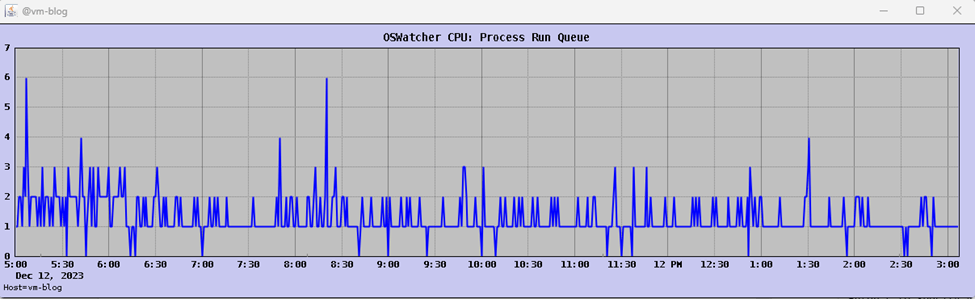
Para este exemplo selecionei a opção
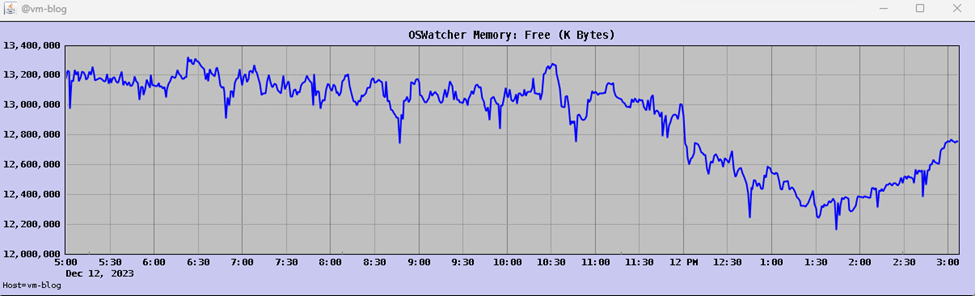
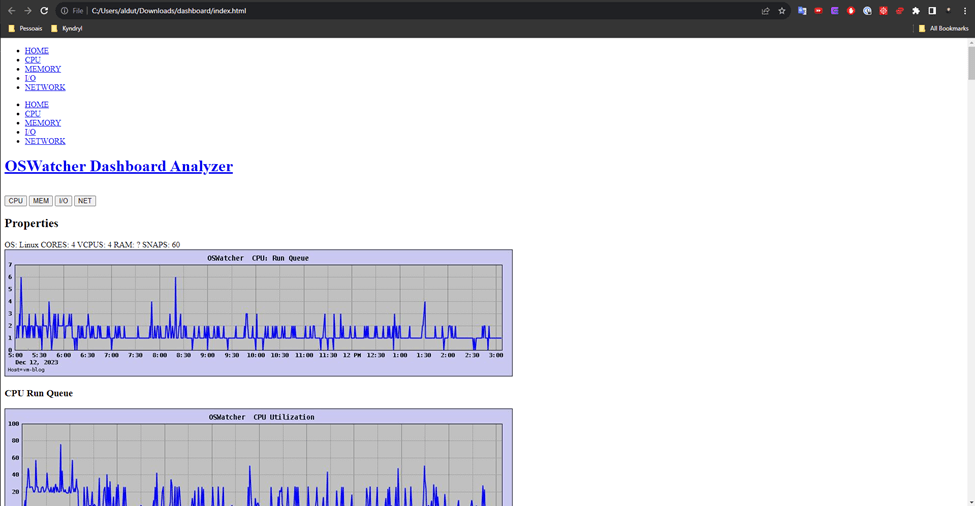
Também podemos gerar um Dashboard para analise.
Please Select an Option:D
Enter a unique analysis/dashboard directory name or enter <CR> to accept default name:

A new analysis file analysis/vm-blog_Dec12050009_1702416975/analysis.txt has been created.

Generating file analysis/vm-blog_Dec12050009_1702416975/dashboard/generated_files/OSWg_OS_Run_Queue.jpg
Generating file analysis/vm-blog_Dec12050009_1702416975/dashboard/generated_files/OSWg_OS_Run_Adjusted_Queue.jpg
Generating file analysis/vm-blog_Dec12050009_1702416975/dashboard/generated_files/OSWg_OS_Block_Queue.jpg
Generating file analysis/vm-blog_Dec12050009_1702416975/dashboard/generated_files/OSWg_OS_HB.jpg
Generating file analysis/vm-blog_Dec12050009_1702416975/dashboard/generated_files/OSWg_PS_Processes.jpg
Generating file analysis/vm-blog_Dec12050009_1702416975/dashboard/generated_files/OSWg_OS_Cpu_Idle.jpg
Generating file analysis/vm-blog_Dec12050009_1702416975/dashboard/generated_files/OSWg_OS_Cpu_Util.jpg
Generating file analysis/vm-blog_Dec12050009_1702416975/dashboard/generated_files/OSWg_OS_Cpu_System.jpg
Generating file analysis/vm-blog_Dec12050009_1702416975/dashboard/generated_files/OSWg_OS_Cpu_User.jpg
Generating file analysis/vm-blog_Dec12050009_1702416975/dashboard/generated_files/OSWg_OS_Cpu_Wa.jpg
Generating file analysis/vm-blog_Dec12050009_1702416975/dashboard/generated_files/OSWg_OS_Cpu_Interrupts.jpg
Generating file analysis/vm-blog_Dec12050009_1702416975/dashboard/generated_files/OSWg_OS_Context_Switches.jpg
Generating file analysis/vm-blog_Dec12050009_1702416975/dashboard/generated_files/OSWg_OS_Memory_Swap.jpg
Generating file analysis/vm-blog_Dec12050009_1702416975/dashboard/generated_files/OSWg_OS_Memory_Free.jpg
Generating file analysis/vm-blog_Dec12050009_1702416975/dashboard/generated_files/OSWg_OS_Memory_Page_In_Rate.jpg
Generating file analysis/vm-blog_Dec12050009_1702416975/dashboard/generated_files/OSWg_OS_Memory_Page_Out_Rate.jpg
Generating file analysis/vm-blog_Dec12050009_1702416975/dashboard/generated_files/OSWg_OS_Cpu_Wa.jpg
Generating file analysis/vm-blog_Dec12050009_1702416975/dashboard/generated_files/OSWg_OS_Block_Queue.jpg
Generating file analysis/vm-blog_Dec12050009_1702416975/dashboard/generated_files/OSWg_OS_IO_ST.jpg
Generating file analysis/vm-blog_Dec12050009_1702416975/dashboard/generated_files/OSWg_OS_IO_AW.jpg
Generating file analysis/vm-blog_Dec12050009_1702416975/dashboard/generated_files/OSWg_OS_IO_PB.jpg
Generating file analysis/vm-blog_Dec12050009_1702416975/dashboard/generated_files/OSWg_OS_IO_RPS.jpg
Generating file analysis/vm-blog_Dec12050009_1702416975/dashboard/generated_files/OSWg_OS_IO_WPS.jpg
Generating file analysis/vm-blog_Dec12050009_1702416975/dashboard/generated_files/OSWg_OS_IO_TPS.jpg
Generating file analysis/vm-blog_Dec12050009_1702416975/dashboard/generated_files/OSWg_link_ lo_rx_ok.jpg
Generating file analysis/vm-blog_Dec12050009_1702416975/dashboard/generated_files/OSWg_link_ lo_rx_err.jpg
Generating file analysis/vm-blog_Dec12050009_1702416975/dashboard/generated_files/OSWg_link_ lo_rx_drp.jpg
Generating file analysis/vm-blog_Dec12050009_1702416975/dashboard/generated_files/OSWg_link_ lo_rx_ovr.jpg
Generating file analysis/vm-blog_Dec12050009_1702416975/dashboard/generated_files/OSWg_link_ lo_tx_ok.jpg
Generating file analysis/vm-blog_Dec12050009_1702416975/dashboard/generated_files/OSWg_link_ lo_tx_err.jpg
Generating file analysis/vm-blog_Dec12050009_1702416975/dashboard/generated_files/OSWg_link_ lo_tx_drp.jpg
Generating file analysis/vm-blog_Dec12050009_1702416975/dashboard/generated_files/OSWg_link_ lo_tx_ovr.jpg
Generating file analysis/vm-blog_Dec12050009_1702416975/dashboard/generated_files/OSWg_link_ enp0s6_rx_ok.jpg
Generating file analysis/vm-blog_Dec12050009_1702416975/dashboard/generated_files/OSWg_link_ enp0s6_rx_err.jpg
Generating file analysis/vm-blog_Dec12050009_1702416975/dashboard/generated_files/OSWg_link_ enp0s6_rx_drp.jpg
Generating file analysis/vm-blog_Dec12050009_1702416975/dashboard/generated_files/OSWg_link_ enp0s6_rx_ovr.jpg
Generating file analysis/vm-blog_Dec12050009_1702416975/dashboard/generated_files/OSWg_link_ enp0s6_tx_ok.jpg
Generating file analysis/vm-blog_Dec12050009_1702416975/dashboard/generated_files/OSWg_link_ enp0s6_tx_err.jpg
Generating file analysis/vm-blog_Dec12050009_1702416975/dashboard/generated_files/OSWg_link_ enp0s6_tx_drp.jpg
Generating file analysis/vm-blog_Dec12050009_1702416975/dashboard/generated_files/OSWg_link_ enp0s6_tx_ovr.jpg
Generating file analysis/vm-blog_Dec12050009_1702416975/dashboard/generated_files/OSWg_IpOutRequests.jpg
Generating file analysis/vm-blog_Dec12050009_1702416975/dashboard/generated_files/OSWg_IpInReceives.jpg
Generating file analysis/vm-blog_Dec12050009_1702416975/dashboard/generated_files/OSWg_IpFragCreates.jpg
Generating file analysis/vm-blog_Dec12050009_1702416975/dashboard/generated_files/OSWg_IpFragOKs.jpg
Generating file analysis/vm-blog_Dec12050009_1702416975/dashboard/generated_files/OSWg_IpInDiscards.jpg
Generating file analysis/vm-blog_Dec12050009_1702416975/dashboard/generated_files/OSWg_IpReasmFails.jpg
Generating file analysis/vm-blog_Dec12050009_1702416975/dashboard/generated_files/OSWg_ip_fragments_in_rate.jpg
Generating file analysis/vm-blog_Dec12050009_1702416975/dashboard/generated_files/OSWg_ip_fragments_out_rate.jpg
Generating file analysis/vm-blog_Dec12050009_1702416975/dashboard/generated_files/OSWg_UdpInDatagrams.jpg
Generating file analysis/vm-blog_Dec12050009_1702416975/dashboard/generated_files/OSWg_UdpOutDatagrams.jpg
Generating file analysis/vm-blog_Dec12050009_1702416975/dashboard/generated_files/OSWg_UdpInErrors.jpg
Generating file analysis/vm-blog_Dec12050009_1702416975/dashboard/generated_files/OSWg_UdpInCsumErrors.jpg
Generating file analysis/vm-blog_Dec12050009_1702416975/dashboard/generated_files/OSWg_UdpRcvbufErrors.jpg
Generating file analysis/vm-blog_Dec12050009_1702416975/dashboard/generated_files/OSWg_UdpSndbufErrors.jpg
Generating file analysis/vm-blog_Dec12050009_1702416975/dashboard/generated_files/OSWg_TcpInSegs.jpg
Generating file analysis/vm-blog_Dec12050009_1702416975/dashboard/generated_files/OSWg_TcpOutSegs.jpg
Generating file analysis/vm-blog_Dec12050009_1702416975/dashboard/generated_files/OSWg_TcpRetransSegs.jpg
Generating file analysis/vm-blog_Dec12050009_1702416975/dashboard/generated_files/OSWg_TcpOutRsts.jpg
Generating file analysis/vm-blog_Dec12050009_1702416975/dashboard/generated_files/OSWg_TcpEstabResets.jpg
Generating file analysis/vm-blog_Dec12050009_1702416975/dashboard/generated_files/OSWg_TcpAttemptFails.jpg
Generating file analysis/vm-blog_Dec12050009_1702416975/dashboard/generated_files/OSWg_tcp_retran_error_rate.jpg

Files written to the analysis directory.
Onde é Gerado um relatório no final da analise.
Espero que isso possa te ajudar em algum momento.
Até a próxima.
Disclaimer: “The postings on this site are my own and do not necessarily represent my current employer positions, strategies, or opinions. The information here was edited to be useful for general purpose, specific data, and identifications was removed to allow reaching a generic audience and to be useful.
André Luiz Dutra Ontalba
DBA ATG Oracle há 27 anos, especialista em Banco de Dados Oracle e SQL SERVER, MySQL, Azure, AWS, Oracle Cloud. Bacharel em Ciências da Computação Pós Graduado pela FIAP em Administração de Banco de dados, MBA em Administração de TI pela FGV a MBA em Master Information Technology pela FIAP e BABSON e Mestrado em Gestão Estratégica em Tecnologias de Informação pela UNIATLANTICO e UNIB . Com sólidos conhecimentos em Banco de Dados e Sistemas operacionais, possui certificações Oracle OCP 10g/11/12g/2019 Oracle Cloud Professional, AWS Professional, Azure Expert e mais 85 outra certificações. Strategic Customer Service Manager at Oracle / Oracle ACE Alumni Member